Businesses that make weekly Google Posts see, on average, a 26% increase in local impressions.
That means they get seen by more people more often.
These posts boost user engagement, leading to more profile interactions, such as phone calls and clicks. These interactions also indirectly improve your profile’s rank in search results.
Making a post is easy, too. We’re going to dive into how easy posting is first, then we’ll take a look at some stats to highlight why they matter.
Wondering what to post?
Here are some easy ideas:
All of these are things you already know about. There’s no work other than recording the video or making the image and then slapping them in a post, following the steps below.
Let’s look at how to make a post together. We’ll create a Post highlighting a 50% off deal for Twin Spires Self Storage in Knoxville.
Pug Pro Tip: Posts about special events or offers (like discounts) get twice as much engagement!
Making a post is easy! The video above will walk you through the process, or you can follow these steps below to familiarize yourself with the process:
That’s it! The hardest part of the whole process is going to be creating your video or image, but we’ve got some advice to make that easier, too.
Pug Pro Tip: Keep the post text short and sweet. Put all the most important information at the start, and be very clear and concise! See the screenshot below as an example.

If you’re already an awesome photo or video editor, great. If not, then here’s some advice on how to easily create media for your new Google Post:
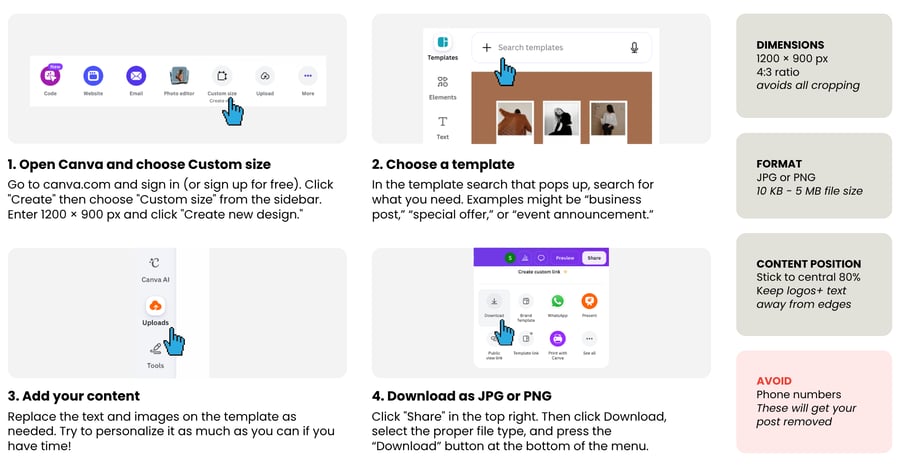
The following best practices make sure your image or video isn’t cropped at the edges when viewed across different devices.
#1 is actually the most important best practice because adding a phone number is against Google’s guidelines. They WILL remove your post if it has a phone number. Instead, insert a Call button when uploading the post.
Posts draw attention when customers are scrolling the Google search results page. They also drive engagement with your GBP.
Users engaging with your storage facility’s GBP, including by interacting with posts, can even lead to improved ranking in local search results.
And according to SQ Magazine, Google Business Profiles with recent posts get as much as 21% more engagement than those without.
This means having recent Google Posts on your GBP can have an indirect benefit to your visibility on Google.
So there you have it: Google Posts may potentially improve your visibility on Google and increase traffic to your website or calls to your self storage business.
And we have already seen how easy it is to make and upload them. So why wouldn’t you hop in? It’s entirely free so long as you have a little bit of time to craft your post!
Here are some of my other favorite posts to check out!
At StoragePug, we build self storage websites that make it easy for new customers to find you and easy for them to rent from you.